
Members & open studio
Membership management that knows what's in the plan
Monthly fee, included kilos and studio hours belong to the same member. In WheelOwl they live in one place instead of three separate lists.
Plans instead of spreadsheets
In a plan you set what a member pays per month and what's included, for example 5 kilos of firing and 20 hours of open studio. You assign each member a plan. From then on WheelOwl deducts from the allowance automatically with every firing.
- Monthly price, firing quota and studio hours per plan
- Minimum term per plan, with the end date on the member
- The allowance is deducted at the firing, not at month end
- Active or paused, without deleting the member

Open studio with QR check-in
Members check themselves in by QR code. The calendar shows you who was there and for how long.
- QR self check-in
- Calendar with bookable slots
- Recurring slots
- Capacity limits
- Hours or visits per plan
- Slot requests from members
- Blockers for courses & holidays

Studio time, sold the way you sell it
Some plans include hours, others visits, some only certain weekdays. Whatever the plan doesn’t cover runs through a card or an hourly rate and lands on the monthly statement by itself.
- Hours or visits per month or week
- Time windows per plan, say Wednesday to Friday mornings
- 10-visit and hour cards, with the balance on the member
- An hourly rate for anything the plan doesn’t cover

Clay, shelf, apron: all on the monthly statement
Sell a bag of clay or rent out a shelf, and you note it on the member. At month end it sits next to the fee, firing fees and studio time on the same statement.
- Items from your catalog or a custom amount
- Monthly charges like shelf rent keep running by themselves
- A preview of the running month before you bill

Members see where they stand
Every member can see their own plan, usage, firings and check-ins. Questions like "How much allowance do I have left?" no longer land with you.
- Remaining quota visible at any time
- Their own firings and pieces at a glance
- Open balances they can follow
- In German or English, per member

Bring your existing members over
Import members by CSV, with a preview before anything is saved. And you can export them just as easily.
- CSV import with preview and corrections before saving
- CSV export for accounting and portability
- Potter's stamp and contact details are kept with the member

This is how it looks in the studio
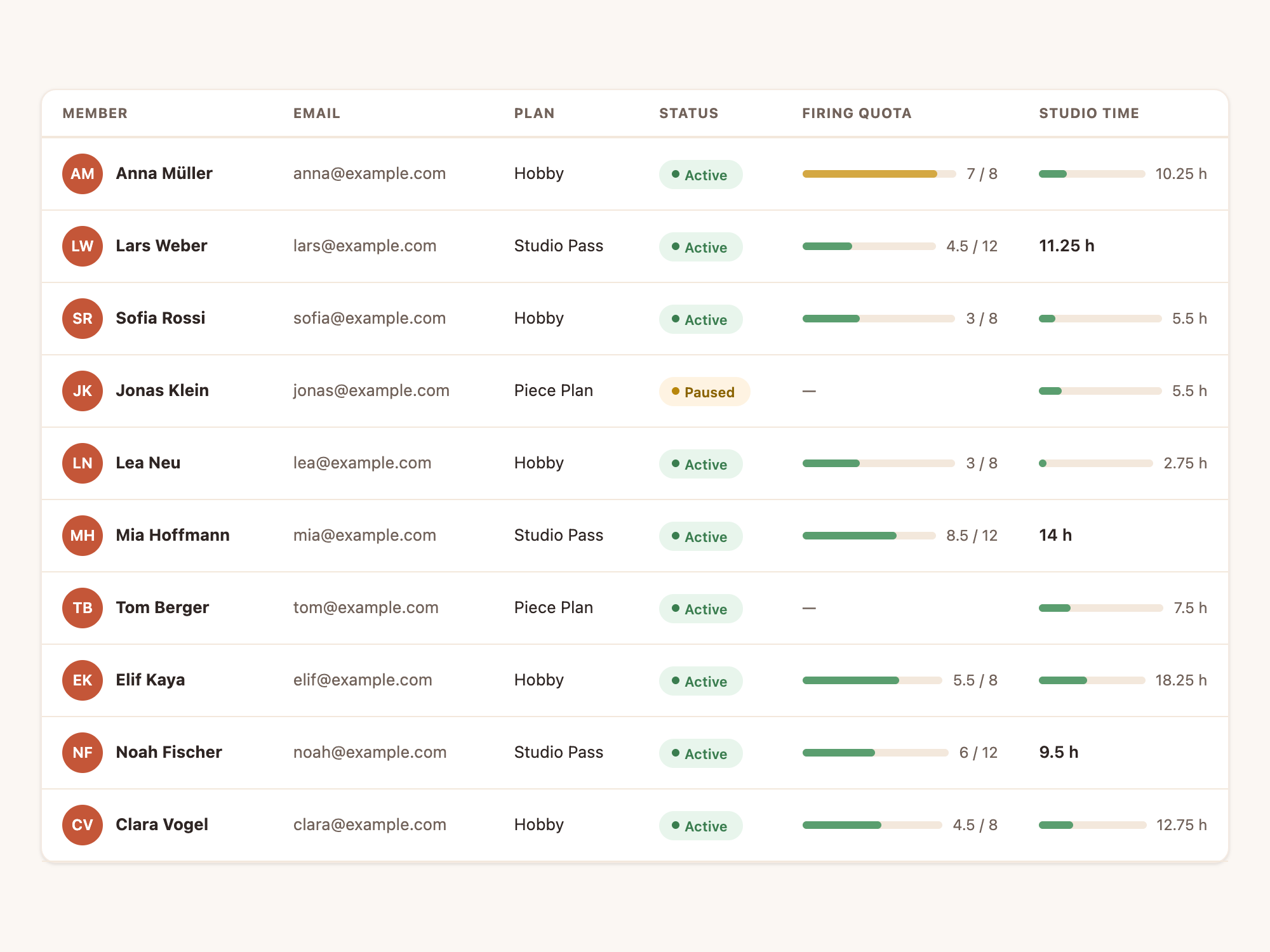
Plans your members understand
Plans, quotas and check-ins in one place, and a month-end without Excel. Get started.
More about WheelOwl
Firing fees
Set up your pricing once, log pieces at the kiln, bill at month-end.
Courses
Create courses, plan sessions, let members and guests book on a public page.
Firing service
Take customer firing orders, estimate cost, and load them into the next firing.
Pricing
Basic, Studio and Studio Plus. Cancel monthly, no transaction fees.
Firing cost calculator
What does a firing cost, what does a kilo cost, what does a plate cost? Run it with your own numbers.